Sinister Jewel Socket PoE2: What They Do and How to Use Them
Short answer: a Sinister Jewel Socket can give a socketed jewel its own value, but it is isolated from the normal passive-tree radius system. Plan it as a self-contained socket, not as a shortcut to nearby passives.
Checked 2026-08-15 · current repository tree data and verified reference pages
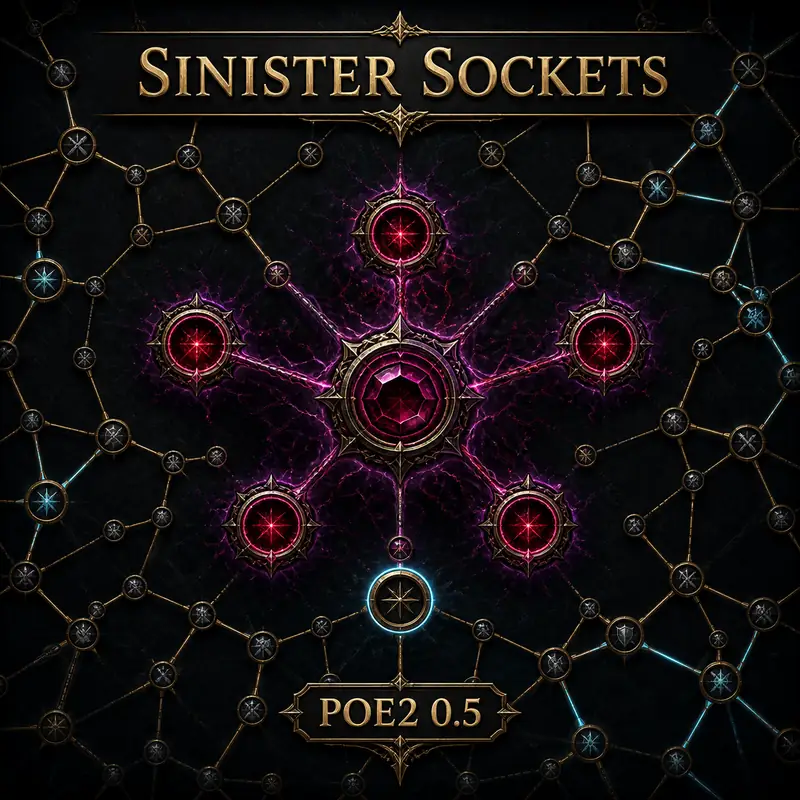
A Sinister Jewel Socket is a special socket associated with a detached part of the PoE2 passive-tree data. It is still a place where a jewel can provide value, but it should not be read as an ordinary socket surrounded by a working passive radius. The current route-lab export contains five nodes whose names include Sinister and whose data marks them as jewel sockets.
The useful distinction is scope. A jewel's own listed bonuses are the first thing to inspect; effects that depend on nearby passive skills, other jewels, or socket radius need a separate check. The mechanics reference used for this page describes sockets outside the main passive tree as not interacting with the passive tree, with radius-based jewel modifiers disabled in that context.
For build planning, this means a Sinister socket is not a free travel shortcut. Do not count it as a normal path node, do not assume a nearby keystone is inside its radius, and do not let a visual connection in an illustration replace the node tooltip. Confirm the current client data before committing an expensive jewel or a patch-sensitive route.
The project tree assets include a jewel icon atlas. The item artwork is separate from the passive-tree socket node and its radius behavior.
How Sinister Jewel Sockets work
Normal Jewel Sockets sit on the main passive tree. You reach them through an allocated route, and some jewels can interact with passive skills or other jewels within a defined radius. That radius is part of the planning decision: a socket can be valuable because of both the jewel inside it and the nodes around it.
The Sinister variant changes that planning boundary. In the repository's current PoE2 0.5 export, the five Sinister nodes use data identifiers such as voices_jewel_slot1 through voices_jewel_slot5, carry the Sinister marker, and are flagged as blighted. These are implementation facts from the local tree data, not a claim that every future patch will use the same identifiers.
The verified wiki mechanics note that jewels in sockets outside the main passive tree do not interact with the passive tree, that radius-based jewel modifiers are disabled there, and that the sockets are not considered to be within the radius of other jewels. It also notes that effects such as The Adorned should not be assumed to extend into this isolated context.
The socket is isolated, not useless
Isolated does not mean empty. A socketed jewel may still matter because of the jewel's own explicit stats or effect. The safe reading is narrower: do not add bonuses that require a normal passive-tree neighborhood unless the current tooltip or patch notes explicitly support that interaction.
This distinction prevents a common planning error. A jewel that looks impressive in a normal socket may lose its route-wide value when moved into a Sinister socket, while a simple jewel with strong self-contained stats may remain a sensible choice. Evaluate the actual item text, not the color of the socket ring.
Why the radius rule matters
Radius is often the hidden reason a jewel socket is worth a long detour. With a Sinister socket, that argument does not transfer automatically. Nearby passives are not a bonus pool, and another jewel cannot be treated as an adjacent neighbor just because the planner view places the icons close together.
When a patch changes the tree, re-check the node name, the socket tooltip, and the jewel text together. This three-part check is more reliable than carrying an old build note forward.
Normal Jewel Socket vs Sinister Jewel Socket
The table below keeps the decision boundary practical. It does not replace a live in-game tooltip, but it makes clear which assumptions belong to a normal passive-tree socket and which ones should be rejected for a Sinister socket.
The project also contains twelve ordinary Jewel Socket nodes in the current tree export, separate from the five Sinister-marked nodes. Use that split when auditing a route: ordinary sockets are route choices inside the main tree; Sinister sockets are a special mechanic with its own interaction limits.
Project tree radius assets make the comparison visible: Sinister sockets do not inherit the ordinary radius relationships shown here.
Check
Normal Jewel Socket
Sinister Jewel Socket
Where it belongs
Main passive tree route
Detached or special socket context
Travel calculation
Count the connected path and its cost
Do not treat the socket as a shortcut through nearby passives
Radius effects
May apply when the jewel and passive text allow it
Do not assume passive or jewel radius interactions apply
The Adorned
Check its normal socket requirements
Do not assume it changes the isolated socket rules
Best evidence
Node tooltip plus surrounding route
Node tooltip, jewel text, and current patch data together
How to check a Sinister socket in the planner
The fastest way to avoid a false assumption is to use the site's search panel before planning around the node. Search is not only for named keystones: the planner indexes jewel sockets as searchable tree objects, and selecting a result lets you inspect the node in context.
Start with the current 0.5 data, search for Jewel, and distinguish a normal socket from a result whose name includes Sinister. Then check the route view and tooltip together. If the node is not connected to the route you expected, do not spend travel points trying to force the illustration to match an older guide.
Finally, inspect the jewel you intend to use. Write down its self-contained bonuses separately from any wording about nearby passive skills, radius, other jewels, or socket effects. That small separation makes import, export, and patch review much easier.
1Open the current PoE2 passive tree and confirm the data version shown by the planner.
2Search for Jewel and select the socket result instead of relying on an icon alone.
3Read the node name and tooltip; mark the result as Sinister when the marker is present.
4Review the jewel's own stats separately from radius, nearby-passive, or other-jewel wording.
5Re-check the route after a patch or imported build changes the passive-tree version.
Common Sinister Jewel Socket mistakes
Most errors come from applying a correct rule from an ordinary socket to a special socket. The planner can show a useful visual context, but the mechanic is decided by the data and tooltip, not by how close two circles look on screen.
Use the checklist as a final review before you spend points or save a build. If the live game disagrees with a guide, prefer the current in-game tooltip and record the patch version so the difference can be investigated instead of silently copied into another route.
Assumption
Why it fails
Better check
Every jewel socket works like a normal socket
Sinister sockets have a separate interaction boundary
Read the socket marker and current mechanics
Nearby passives are inside the jewel radius
The isolated socket is not part of the ordinary radius graph
Separate jewel-only value from radius value
The Adorned automatically fixes the difference
The reference mechanics explicitly warns against that assumption
Verify the current item and socket wording
A socket can be allocated on either weapon-set tree
The mechanics reference treats Jewel Sockets as unavailable for one weapon-set passive tree
How many Sinister Jewel Sockets are in the PoE2 tree?
The current repository export contains five nodes with the Sinister marker and twelve ordinary Jewel Socket nodes. Treat these counts as versioned tree-data evidence and re-check them after a passive-tree update.
Do Sinister Jewel Sockets connect to the normal passive tree?
They should be planned as isolated special sockets. The verified mechanics reference says sockets outside the main passive tree do not interact with the passive tree and are not within the radius of other passive skills or jewels.
Does The Adorned work on a Sinister Jewel Socket in PoE2?
Do not assume it does. The mechanics reference states that isolated sockets are unaffected by jewels that affect other jewels, including The Adorned. Confirm the current tooltip if a patch changes the item or socket rules.
Can I use a Sinister socket as a shortcut for nearby passives?
No. A visual relationship is not a connected route. Count only the allocated path shown by the current tree and treat the socket's own jewel value separately from nearby passive or radius effects.
How do I find a Sinister socket in the passive tree planner?
Open the current tree, search for Jewel, select the result, and read the node name and tooltip. A result marked Sinister should be reviewed with its jewel text and patch version before you save the route.
Are Sinister Jewel Sockets a new passive-tree page or a planner feature?
They are a distinct mechanic guide rather than a replacement for the interactive planner. Use this page to understand the boundary, then open the planner to inspect the live node and test a route.
Sources and verification
This page combines the repository's current PoE2 0.5 tree export with the following public references. Community wiki pages are cited as community references, not as official statements; patch-sensitive behavior should be checked in the live client.